Posts for: #Linux

[LINUX] Cleaning up a full boot partition

[LINUX] Cleaning up a full boot partition

Rarely, but it can happen that the /boot partition fills up on Linux machines, in which case it’s worth deleting the old kernels, but this isn’t always straightforward.

You can check the disk usage with the following command:

df -h
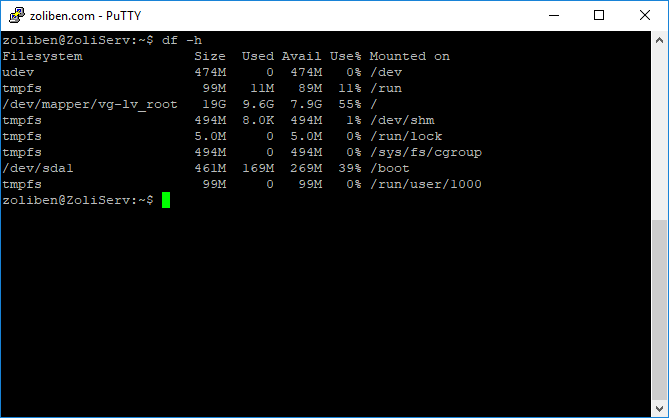
The image shows the state after cleaning, so the /boot partition is now only at 39% usage

In this case, apt-get upgrade gets interrupted during the kernel update, since there’s no more space on the partition. This constantly throws errors, and there are cases (like mine) where updates can’t run at all anymore because previous ones have failed.


[Read more]

Fixing Slow Steam Downloads on Ubuntu

Fixing Slow Steam Downloads on Ubuntu

I installed Steam on Linux just to try it out, but I ran into the problem that when downloading games, the download speed wouldn’t climb above 15-20 kbytes/s. I tried switching download servers, switching from Wi-Fi to a wired connection, but nothing worked. Then I started searching online for solutions, which led me to the following steps that fixed my problem.

In a nutshell, the problem is that the Linux Steam client queries DNS nameservers too frequently, which quickly overwhelms the network. The solution is to install a DNS cache on the system, which we can do as follows:

[Read more]

Installing Squid Proxy on Ubuntu Server

Installing Squid Proxy on Ubuntu Server

First, let’s update the repositories:

apt-get update

Then install the proxy software and the associated password generator:

apt-get install squid apache2-utils

Once that’s done, let’s create an empty configuration file:

rm -rf /etc/squid/squid.conf
touch /etc/squid/squid.conf
chown proxy /etc/squid/squid.conf

Then create the password file:

touch /etc/squid/squid_passwd

Then grant permissions to the proxy:

chown proxy /etc/squid/squid_passwd

Start editing the configuration file:

nano /etc/squid/squid.conf

and add the following lines (for http_port, specify the port you want to connect to the proxy on):

[Read more]

Call of Duty: United Offensive Linux Server and Other Goodies

Call of Duty: United Offensive Linux Server and Other Goodies

I’ve been planning for a long time to write a guide about one of my favorite games, Call of Duty United Offensive. For me, this was the best game back in the day alongside MoHAA, because IT HAD TANKS!

We played the hell out of it on Kursk, Carentan, Fox, and the Bas maps.

I feel like because of all the fun I had, I owe it to the game to not let it disappear into obscurity, so below I’ll describe how to set up a Linux dedicated server, how to configure 1920x1080p resolution, which ports need to be opened, and maybe I’ll even have time to cover mods.

[Read more]

EasyBCD – Easy Boot Configuration

EasyBCD – Easy Boot Configuration

Because of university, I need a Linux installation as well, but due to the limited RAM in my machine, the virtual machine solution isn’t the best. (plus it’s good to have something else alongside Windows in case something goes wrong)

You can struggle a lot with the boot order/menu, which can be done very easily with a program called EasyBCD.

The main menu looks like this:

The current boot settings can be edited under Edit Boot Menu, where you can set which operating system to start by default, as well as configure the order and the timer for how long the menu is available.

[Read more]

Installing qBittorrent on Ubuntu

Installing qBittorrent on Ubuntu

Many people have become disillusioned with utorrent in recent months, including myself. I looked into other torrent clients and found qBittorrent. It’s simply fantastic! Its web client works perfectly in mobile browsers, and the system itself is very stable.


It can be installed on Ubuntu as follows:

You need to add its repository to the cache:

add-apt-repository ppa:qbittorrent-team/qbittorrent-stable

Update the source list:

apt-get update

Depending on whether you want only the web client or also the desktop client, install accordingly:

[Read more]

Linux Commands

Linux Commands

Here I just want to collect the more important Linux commands for myself, so I can easily find them later.

Vi


Delete all lines – :1,$d


(this post will be continuously updated)


[Read more]

Another VPS in My Possession

Another VPS in My Possession

Today I came across an interesting package from the provider MyRSK, first on lowendtalk, which I only glanced at, then my friend linked it to me and pointed out certain details. I didn’t hesitate any longer, I’d been looking for a decent VPS with relatively lots of RAM and no monthly payment, so I ordered the package, which has the following specs:

  • 2 shared CPU cores
  • 200 GB HDD
  • 2 TB monthly data transfer
  • 2 GB RAM

I ran a quick benchmark on it, here are the results:

[Read more]

Installing Java on Ubuntu

Installing Java on Ubuntu

If you want to run a Java app on a fresh Ubuntu server, (say Minecraft) then you first need to install the appropriate Java runtime. You can do this as follows:

Update the apt repository with the following command:

sudo apt-get update

Then check if Java is already installed:

java -version

Install the Java Runtime Environment with the following command:

sudo apt-get install default-jre

And for the Java Development Kit, use this:

[Read more]

MOHAA Dedicated Server on Ubuntu 12.04

MOHAA Dedicated Server on Ubuntu 12.04

Back in the day I played Medal of Honor Allied Assault a lot, I think it’s the best game in the series and my personal favorite. Yesterday I somehow felt like picking the game up again, but I ran into several issues. For one, I don’t have a DVD drive in my PC, I somehow managed to tear off the CD keys from my Warchest collection, plus with GameSpy shutting down, it wasn’t really possible to find servers. After a bit of searching online, I found the modded version of MOHAA (plus Breakthrough and Spearhead), where they replace the GameSpy server browser, add FullHD resolution support and whatnot. (plus it runs perfectly on win 8.1 64 bit) The download from their server was pretty slow, so I uploaded it here as a mirror, which you can download from the Downloads page, or from here.

[Read more]