Good places in Szeged – Part 1 (Bohém tanya)

Good places in Szeged – Part 1 (Bohém tanya)

I had the idea of collecting the entertainment venues in Szeged and sharing my opinions about them.

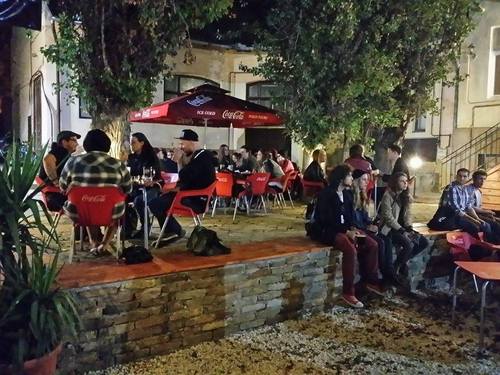
In this week’s post I’m putting Bohém tanya under the microscope, since I spent pretty much my entire week there and it became one of my favorite places, and I think it’ll become a regular spot in our friend group.

The backstory is that back in high school we used to visit the Pivo pub quite often, but to be honest it’s not a particularly good place (I’ll get into that in a later post). A buddy of mine suggested over the weekend that we check out the bohém garden, as it’s a pretty cool place. At first sight I „fell in love„ — the outdoor garden is spacious, there’s plenty of room, the atmosphere is great and there are always enough people, yet it’s not crowded. A bonus is that there’s a food stand right next to it, so while drinking beer you can order all sorts of goodies (pizza, gyros, etc.) if you get hungry. There’s an indoor area too, but it’s not worth using in the summer since it can get quite hot.

[Read more]

Removing Skype ads

Removing Skype ads

In the latest Skype, the ad bar above conversations is quite annoying, so I’ll share how to get rid of it.

Exit Skype completely, then in File Explorer navigate to

C:/Users/YourUsername/App Data/Roaming/Skype/YourSkypename

folder, then open the config.xml file and find the following line, and delete it entirely:

<AdvertPlaceholder>1</AdvertPlaceholder>

Save it, then right-click the file, properties, and check the „Read-only” option, click OK, and you can start Skyping without ads 🙂

[Read more]

PHP snippets for myself

Searching in a string:

echo strpos(„Hello world!”, „world”); // outputs 6

Replacing text in a string:

echo str_replace(„world„, „Dolly„, „Hello world!„); // outputs Hello Dolly!


[Read more]

CheVolume – Or How to Play Any Music on Any Device

CheVolume – Or How to Play Any Music on Any Device

I have a habit of streaming music to my friends when we’re playing. I used to pipe the music through TeamSpeak, but for some reason TS got tired of it after a while and decided not to relay the music completely, so I had to look for another solution. I found the solution in the combination of Virtual Audio Cable and Icecast, which I’ll explain right away.

Virtual Audio Cable, as the name suggests, creates a virtual audio cable, the point of which is that you can set specific programs to output/play their sounds on a particular playback device. This is interesting because I only wanted to pipe the music through – it would have been pretty weird if the entire speaker content was relayed, since then people would have heard themselves back. The “cable” created by Virtual Audio Cable was then streamed via a program called Butt to my Icecast server, which my friends could listen to as a web radio.

[Read more]

Lack of Posts

Lack of Posts

Well, I haven’t had time to post lately between work and university, but I’m planning to upload some guides in the near future, so stay tuned 🙂

[Read more]

World of Tanks 9.7 Realistic Gun Sounds

World of Tanks 9.7 Realistic Gun Sounds

I don’t fundamentally have any issues with WoT’s sound design, but this mod is simply fantastic! Playing with it is much more enjoyable, and you really get immersed in the battle 🙂


You can download the mod from here. (it’s for version 9.7)

Installation:

There are two folders in the ZIP, res and res_mods. These need to be copied into the WoT installation folder, overwriting the old files.

[Read more]

Garry’s Mod Server

Garry's Mod Server

Behold! Our Garry’s Mod server has (once again) opened!

Its fantastic name is: [HUN] ZoliBen Csupra(kabra) – fittingly

To make everything run smoothly on the server, it’s recommended to download this addon pack.


How can you connect to this fantastic server? Simply add this IP address to your favorites list!

IP: 87.117.200.66:27015


The rules are written on the server, please follow them. Currently there are two admins, ZoliBen (me), and gtadam (when his PC isn’t crashing)

[Read more]

Downloading Garry’s Mod Server Addons

Downloading Garry's Mod Server Addons

Anyone who has a dedicated GMod server has probably encountered the error where the server can’t download larger addons from the workshop, showing “Download fail”.

The only solution for this is if the addon is already downloaded on your home computer as well, which you can find at the following location:

Steam/steamapps/common/GarrysMod/garrysmod/addons/

Here you can find the addon by name, which in my case looks like this:

garrys_bombs_5_base_edition_290395033.gma

Upload this to the server’s GMod addons folder, then rename it so that only the number sequence at the end remains, with a “ds_” prefix added before it:

[Read more]